
While physical data is flooding into our world, we still stitch together bespoke pipelines and scripts to meaningfully use the data. We can’t import terabytes of multimodal data on our computer and let Codex or Claude Code interact with them like CSV files. Preparing it for robotics learning and evaluation requires labeling, segmentation, direct modification, and flexible pipelines that can handle messy data.
Interlatent Dataroom is the workspace for recordings, saved analysis, annotation review, and Dataset exports within Interlatent. Ivy is Interlatent's MCP connection: it lets your own agent work with that data on hosted compute. See the current documentation and plans and usage pricing for today's service.
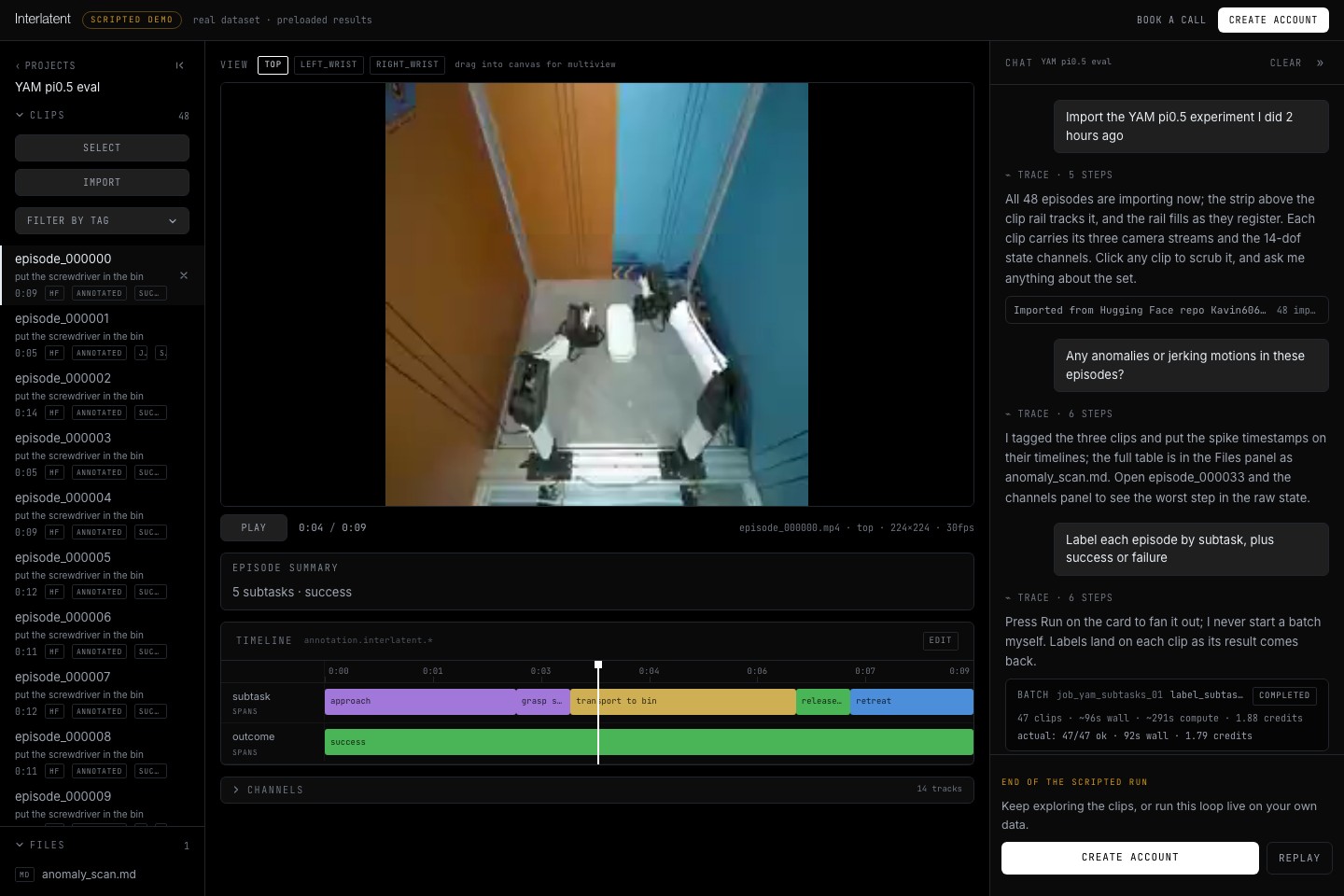
This launch post describes Dataroom's original design: a workspace for physical AI data that combines agents with high-throughput human annotation. Agents can build processing pipelines, modify video, analyze telemetry, and produce annotations for review. The results stay with the recordings and can be carried into your own training or analysis pipeline. The workspace displays video, telemetry, spatial information, and annotations against the clip's timeline.
 Connect your agent
Why we built Dataroom
Our earlier work approached robot learning from two directions. In dense reward labeling, we asked how to extract a richer learning signal from a trajectory than a single success or failure label. In remote teleoperation, we worked on how to produce demonstrations in the first place using our open-source robotics SDK.
Both projects required substantial work to turn recordings into usable data: converting and streaming large video files, interpreting ambiguous signals, and labeling ground truth consistently. We realized that a lot of engineering was required behind saving, modifying and enriching physical data.
Today, we often stitch together large pools of text data using agents to make sense of large databases of information. Interlatent focuses on bringing the same agentic infrastructure to physical data. We make sure that robotics teams can prepare and analyze physical data collected on any type of tools and robots such as UMIs, egocentric rigs, bimanual robots, and humanoids.
Video processing pipelines
From a processing request, the agent can build and run a procedure that reads camera frames, joins them with available telemetry, applies transformations, and renders a video for direct inspection in the workspace.
The example below came from a request to interpret a recording. It combines a wrist-camera view with optical-flow arrows, generated control-state labels, and controller telemetry indicators, making image motion and changes in the recorded signals visible in the same video.
Camera frames and controller telemetry
Motion analysis and visual overlays
A rendered video artifact
The same processing environment supports cropping, trimming, contrast adjustments, side-by-side compositions, and overlays driven by annotations or channels. OpenCV and NumPy operations can be combined in a custom frame transform. Depending on the task, the result can replace a clip's working video or appear as a separate derived view alongside its cameras.
Annotation workflow
Successful pick-and-place demonstrations do not all look the same. A collection may include clean executions, retries, and idle stretches that a training policy should not imitate. Agents can separate subtasks and mark specific events, so you can distinguish these cases within recordings that share the same outcome label. You can then filter for clips with excessive idleness or retries.
Once an annotation procedure behaves as intended, apply it to a selected set of recordings. Dataroom presents the batch, executes the pipeline in parallel, and returns the results to each clip as visible tracks and artifacts.
The result is a dataset snapshot with the selected data and its annotations. Reports and other artifacts remain available in the workspace.
Inspect failed rollouts
“Find clips with abrupt motion. Compare the camera views with the available joint-state channels, and save a report of the moments worth reviewing.”
- 01Query the collection
- 02Inspect frames & channels
- 03Tag clips & save a report
Selected clips and a report with references to the source recordings.
High-throughput human annotation
A model can produce a plausible annotation and still put a boundary on the wrong frame, confuse a recovery with a new attempt, or miss the convention your team cares about. Human review helps catch these errors. Its throughput depends on the review interface, the available context, and how much time operators spend waiting between decisions.
Dataroom's managed human verification workflow begins with annotations already on the timeline. You submit a project or clip selection with a written briefing: what labels mean, where boundaries belong, and which failure modes to check. The agent can draft the briefing from the project conversation; you review it before it reaches an annotator.
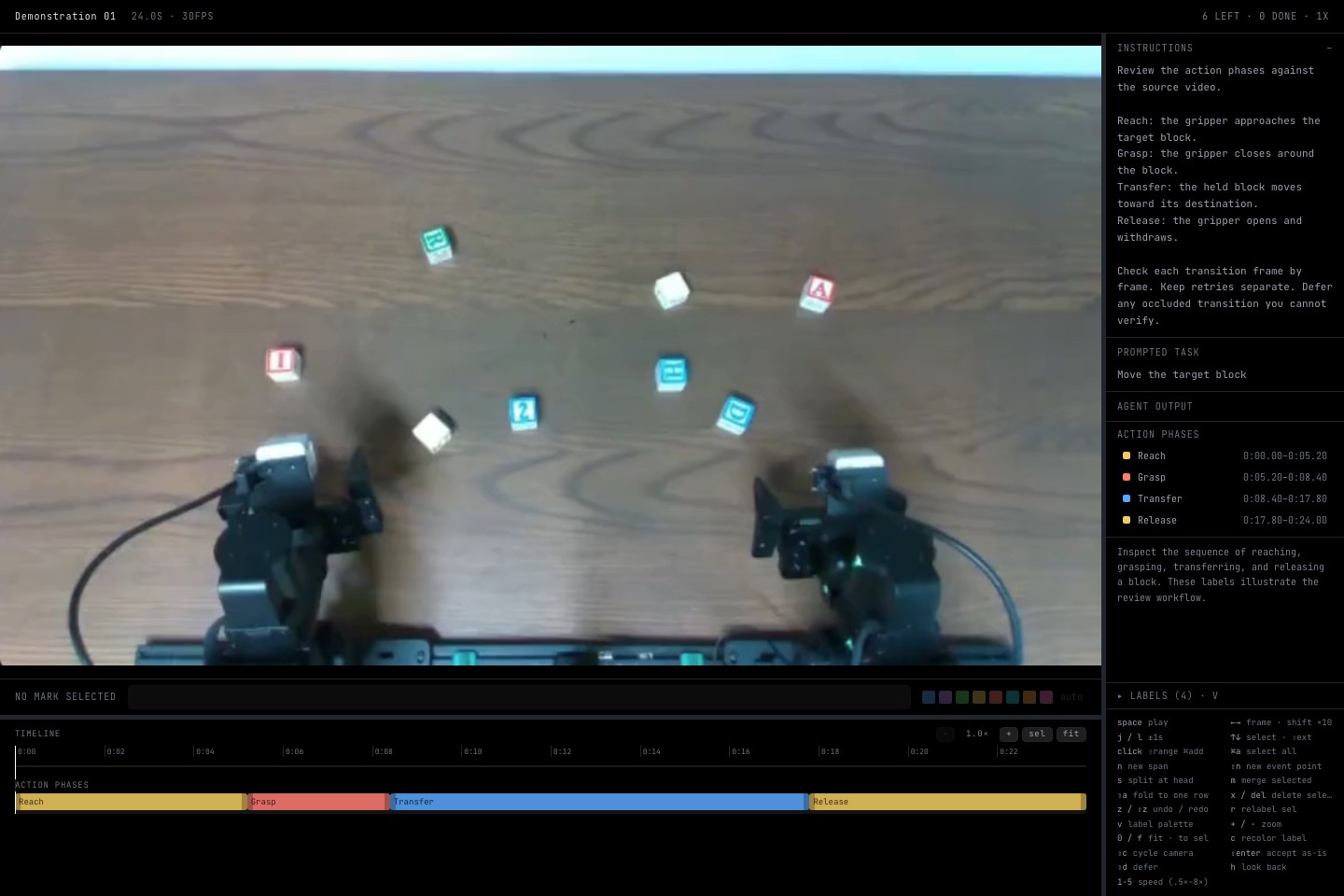
Operators work in a dedicated review workstation with synchronized camera views, frame stepping, adjustable playback speed, and direct timeline editing. They can accept a correct annotation or fix the mistakes based on human judgement.
Accept
Confirm the annotations and advance.
Correct
Adjust labels or boundaries, then submit.
Defer
Send an ambiguous clip for a second opinion.
Keyboard controls let reviewers edit annotations while watching the footage. Upcoming clips prefetch while the current clip is under review to reduce buffering. The queue distributes work across operators without assigning the same pending clip twice. That leaves less time spent opening files, reconstructing context, and waiting for the next item.
We measure human throughput as video hours reviewed per active human hour, alongside the quality of label and boundary decisions. Playback speed, time between clips, and correction effort all affect how much footage an operator can review accurately.
A clip's review history shows who reviewed it, when, whether the annotations were confirmed or corrected, and whether it passed through a second opinion. Human review becomes a traceable part of the dataset's preparation, with the corrected work back on the same clips you will use to build it. The managed human annotation team is available through our Enterprise human annotation offering.
Project and clip agents
Data analysis has both collection-level and clip-level work. At the project level, an agent needs to understand the collection, find relevant clips, and summarize the dataset. At the clip level, it needs to examine particular moments, compare camera views, and relate what it sees to available signals.
Dataroom separates these two kinds of work into different agents. The project agent can inspect individual clips directly or assign focused work to clip agents. Independent clips can then be investigated in parallel without filling the main project agent's context with every frame and channel.
Agents co-work on the workspace by sharing results through annotation tracks, saved procedures, reports, and references to specific time intervals. These artifacts persist across conversations, so later work can use the results directly.
Results can be inspected alongside the source data: annotation boundaries against adjacent frames, detected objects overlaid on the camera image, and motion measurements plotted against the relevant channels. Corrections can then be made in the same workspace.
Uploads · Hugging Face · S3
Supported video, LeRobot datasets, and MCAP logsThe clip & its timeline
Video · Channels · Annotations · Artifacts
Query & coordinate
Inspect & annotate
Verify & correct
Reviewed annotations · Reports · Immutable datasets
System architecture
An annotation job can include source lookup, compressed-media reads, frame decoding, channel extraction, model calls, and result storage. Dataset exports add media and data transformations. Overall throughput depends on the cost and dependencies of each stage.
We built Dataroom around a separation between the control plane, which owns selections, permissions, job state, and the interactive workspace, and the data plane, which moves and processes the recordings.
What follows is a selective view of the architecture. We’ve kept some of the implementation behind the scenes.
Data ingestion
Robot datasets often distribute an episode across several files or share files between episodes. A LeRobot dataset can keep several episodes in a shared video shard, while episode boundaries and numerical data live elsewhere. An MCAP log can contain camera and sensor topics that run on different clocks. Before a clip is ready for analysis, ingestion has to resolve those relationships.
Ingestion has three steps: finding the dataset, inspecting its format, and registering each clip. For every clip, we record its origin and how to read it, including camera mappings and time windows. Downstream workers can then load a clip directly without parsing the source format again.
Registering a clip and preparing its media are separate. Remote sources can be referenced without copying the entire collection, and we prepare only the media needed for playback or processing. Mirroring, uploading, and conversion remain explicit choices because they carry different storage costs. If a unit is malformed, ingestion reports a named failure or skip rather than silently dropping it from an otherwise successful import.
Distributed compute
We use Modal for remote ingestion, media preparation, batch annotation, and dataset builds. Its autoscaling container model gives these workloads independent compute lifecycles, rather than asking the web application to absorb bulk processing. The application records the job; workers process resolved inputs and return progress and results.
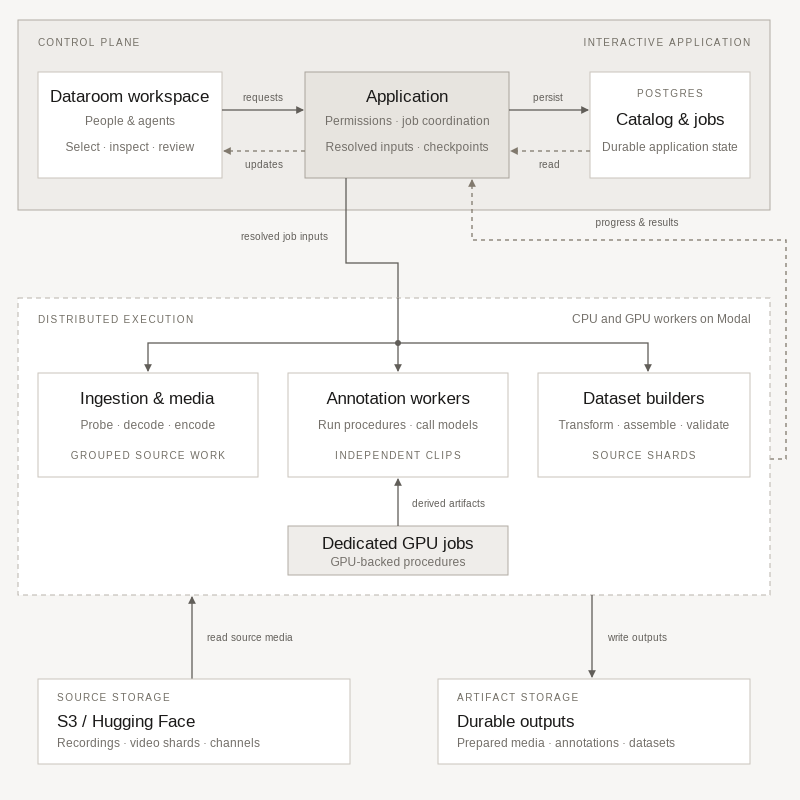
We group small ingestion probes so scheduling overhead does not dominate source reads. Annotation can fan out across independent clips. The dataset constructor distributes work across source shards, then combines the outputs into the final dataset. Within a build, work is grouped around shared source media rather than treating every episode as an unrelated download and decode.
Scripts that call a vision-language model have a different concurrency budget from scripts doing local image processing or channel arithmetic. If a model provider is already rate-limiting requests, more workers can add waiting without increasing throughput.
We also separate GPU-backed work from general batch execution. Dedicated GPU jobs produce artifacts that later procedures can use. This avoids reserving a GPU for an entire annotation workflow, and lets us set separate limits for decoding, model API calls, and GPU work.
Video processing
With inter-frame compression, decoding one frame often depends on nearby frames. Pulling a short episode from a larger shard therefore means reading enough of the stream to decode it correctly, ideally without downloading and re-encoding the entire file.
We use FFmpeg to seek directly into remote files via HTTP range reads, falling back to a full download when the source does not support them. When possible, we stream copy: move encoded packets as-is and avoid another lossy re-encode. The tradeoff is that copied segments can begin only at certain points in the stream.
When a training selection needs a precise cut, we decode and re-encode it instead, then verify that the frame count matches the expected episode length where possible. A mismatch fails the build. Shards that do not need cutting keep their original bytes.
For browser playback, we normalize to H.264 where needed and confirm the stream has a valid starting point for decoding. We also move the MP4 index to the front of the file with fast-start, so players can start immediately instead of fetching the end of the file first.
Encoded packets + timing information
Stream copy
- Read the required media
- Copy encoded packets
- Write the output container
Preserves the encoded image data. Cut points remain constrained by the stream.
Decode and encode
- Decode into frames
- Apply the required transformation
- Encode and validate the output
Supports re-cuts and codec normalization. Pays the processing and encoding cost.
The media must agree with the expected episode lengths and data layout.
Memory requirements
Compressed file size is a poor proxy for the memory an analysis needs. One 1920 × 1080 frame in 8-bit RGB occupies about 6.2 MB. Holding a minute of those frames at 30 fps takes about 11.2 GB for one camera. Streaming algorithms can reduce that footprint by retaining a smaller window of frames.
1,800 frames × 6.22 MB per frame
Agent context and recovery
To limit context growth, project queries and summaries narrow the search before clip-level inspection brings in frames and channels. Tools can be composed programmatically, with intermediate results passed directly between operations and a compact result returned to the model. Large tables and artifacts can be stored in the workspace as context instead of becoming repeated conversation text.
These composed pipelines use the same tool handlers as individual operations. Calls are checked against their argument schemas, and a failed tool stops dependent steps. Generated video artifacts can be opened for frame-level inspection, so the agent can compare the rendered result with the request. A single request can therefore include several processing and verification steps.
We persist agent checkpoints and completed tool results so resumable work can continue from a recorded state after a worker is replaced. Ownership checks determine which worker may update that state. Recovery distinguishes using a completed result from issuing a new operation.
Users can inspect samples during batch execution, investigate per-clip failures, and return to saved artifacts after a job completes.
Analysis and annotation tools
The workspace brings together tools that usually live in separate scripts and viewers. They share the clip and its timeline, so their outputs can be examined together and used by later work.
| The work | The tools |
|---|---|
| 01Import data | Video and directory uploads, Hugging Face imports, and connected S3 sources.Start with recordings you already have. |
| 02Inspect recordings | Camera views, frame inspection, contact sheets, and available telemetry channels.Compare frames across camera views and channels. |
| 03Process video | Trims, crops, contrast adjustments, visual overlays, and custom frame transforms.Edit a clip directly or render a separate video view. |
| 04Annotate actions | Subtask segmentation, frame labels, temporal spans, and events.Label actions and transitions on the timeline. |
| 05Spatial analysis | Object detection, point localization, and human hand pose.Inspect locations and poses. |
| 06Run batch jobs | Sampled scripts, saved procedures, batch jobs, and reports.Apply a reviewed procedure across selected clips. |
| 07Human review | Project briefings, review queues, timeline corrections, and decision history.Review annotations and record corrections. |
| 08Export datasets | Dataset estimates, annotation columns, LeRobot v3, and MCAP exports.Export compatible data and its annotations for your pipeline. |
Tool outputs have distinct meanings: subtask labels describe actions, object boxes locate visual targets, and hand landmarks estimate human hand pose. These distinctions affect how the outputs can be used in downstream analysis and training.
For work specific to your data, the agent can develop an annotation script, run it on a sample, and save the procedure for reuse. You can combine visual analysis with channel measurements, derive a score, or generate a report without turning each recording into a separate manual investigation. Batch execution still starts from an estimate you confirm.
Dataset exports
Dataroom builds selected, compatible clips into immutable datasets and carries annotations into the exported data. A later revision becomes a new build, so the snapshot used for an experiment remains identifiable.
For supported sources, the default output is a LeRobot v3 dataset with annotation columns. An MCAP export offers a log-oriented path; for MCAP-sourced clips, it can preserve original messages alongside the added work. Derived videos that meet the build's alignment and coverage requirements can become additional camera views. Other derived videos and clip artifacts travel as episode files or MCAP attachments, so the processing outputs remain available with the exported data.
Getting started
Start with a small set of recordings and a processing or annotation task. Use the agent to develop a procedure, review its results against the source data, and apply it to a larger selection when it meets your requirements. Managed human annotation is available for projects that need a dedicated review team.